
Add Your Heading Text Here
- HOME
- CRM CTI Softphone Dialer
JET INTERACTIVE
CRM CTI Softphone Dialer: Make and Receive Calls Directly From Your CRM
Stop switching between your phone system and your CRM. Do it all in one place.
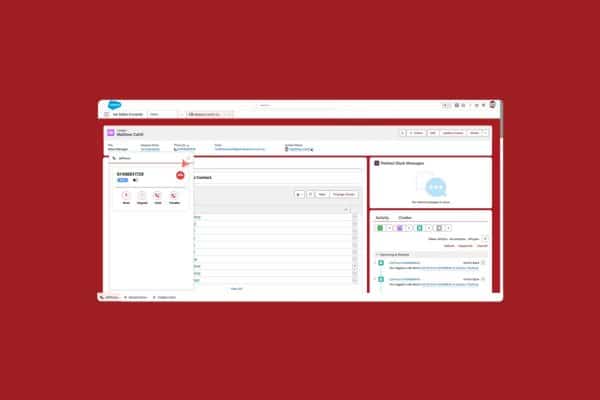
Every time a sales rep switches between their phone and their CRM, they lose time. They lose context. They lose details. A customer calls, the rep scrambles to pull up their record, the call ends, and then comes the manual logging—typing notes from memory, updating fields, hoping nothing gets forgotten. Multiply that across a team of ten, twenty, or fifty reps taking dozens of calls a day, and you’ve got a serious productivity problem.
The CRM CTI Softphone Dialer solves this. It integrates your phone system directly into your CRM using Computer Telephony Integration technology, so your team can make and receive calls without ever leaving the CRM interface. Everything logs automatically. Every call is recorded. Every interaction is tracked. Your team focuses on customers, not admin.
What Is CTI?
Computer Telephony Integration, or CTI, is the technology that connects your phone system to your computer software. In this case, it connects your phone calls directly to your CRM. When a call comes in, your CRM automatically pulls up the caller’s record. When a call ends, it automatically logs the interaction. Your team doesn’t need to do any of this manually—CTI handles it all behind the scenes.
Jet’s CRM CTI Softphone Dialer takes this further by layering in call tracking, marketing attribution, AI summaries, and digital marketing integrations. It’s not just a CTI solution—it’s a complete call management and marketing intelligence platform built into your CRM.
How It Works
Your team logs into their CRM as normal. The softphone dialer appears as a panel within the interface. Incoming calls trigger an automatic screen pop showing the caller's full CRM record—their history, previous interactions, open opportunities, and which marketing campaign brought them to you. Your rep answers directly through the dialer, conducts the call, and when it ends, everything logs automatically to the right record. No switching tabs. No manual entry. No forgotten details.
Outbound calls work the same way. Click a phone number anywhere in your CRM and the dialer places the call instantly. No dialing. No mistakes. No time wasted.
See what marketing drives calls to your businesses.
Key Features
See what marketing drives calls to your businesses.
- Automatic Screen Pops When a call comes in, the caller's CRM record appears instantly. Your rep has full context before saying hello—who they are, what they've bought, what issues they've raised, and what marketing brought them in.
- Click to Dial Click any phone number in your CRM to place a call immediately. Works across contacts, leads, opportunities, and cases.
- Automatic Call Logging Every call automatically logs against the right CRM record with timestamp, duration, recording link, and outcome. Zero manual entry required.
- Live Call Recording All calls are recorded automatically and stored securely in the cloud. Access recordings directly from the CRM record at any time.
- AI Call Summaries After every call, AI generates a summary of key discussion points, outcomes, objections, and next steps. Your team gets the highlights without listening to full recordings.
- Marketing Attribution See which digital marketing campaign drove each call. Was it Google Ads, Facebook, organic search, or a referral? This attribution data displays on every call record so your team understands the customer journey.
- Inbound Number Support Handle calls on 1300 numbers, Australian business numbers, and direct lines—all through the same softphone interface.
- SMS from Your CRM Send and receive text messages directly from customer records. All messages log automatically just like calls.
- Live Call Monitoring Managers can listen to live calls for quality assurance and coaching. No need to be physically present—monitor from anywhere through the CRM interface.
- Google Ads and Analytics Integration Call outcomes and sales values automatically sync to Google Ads and Google Analytics. Your campaigns optimise based on real phone conversions, not just clicks.
Three Ways Teams Use the CRM CTI Softphone Dialer
See what marketing drives calls to your businesses.
- 1. Inbound Sales and Service Teams Handle high volumes of inbound calls efficiently. Screen pops give reps instant context, automatic logging saves time, and AI summaries keep managers informed without micromanaging.
- 2. Outbound Sales Teams Click to dial speeds up outbound calling dramatically. Reps spend more time talking and less time dialing and logging. Call recordings help managers coach performance.
- 3. Blended Teams Handle both inbound and outbound calls through the same interface. The dialer manages queuing, routing, and logging automatically regardless of call direction.
The Business Case for CTI
Let's talk numbers. If a rep takes fifty calls a day and spends two minutes per call on manual logging, that's nearly two hours of admin every single day. Across a team of ten reps, that's twenty hours of productivity lost daily to data entry that a CTI solution eliminates entirely.
Beyond time savings, there's accuracy. Manual logging means forgotten details, typos, and gaps in your CRM data. Automatic logging means complete, accurate records every time. Your sales intelligence improves, your reporting becomes reliable, and your team has the data they need to close deals.
Why Jet's CTI Solution Stands Out
Jet has spent seventeen years mastering call tracking and building deep integrations across CRM platforms. This expertise means Jet's CTI solution goes beyond basic phone integration. You get marketing attribution, Google Ads optimisation, AI summaries, and live monitoring built in—features that most CTI solutions charge extra for or simply don't offer.
The system works in the background without intervention. AI matches calls to the right records automatically, even when phone numbers are formatted differently or callers use different contact details. This matching accuracy, built on years of call tracking experience, is what sets Jet apart.
Getting Started
Setup is handled by Jet's team. Most implementations are complete within days. Your CRM is configured, phone numbers are set up, and your team is trained. Once live, the system runs automatically. There's no ongoing maintenance burden on your IT team and no technical expertise required from your reps.
Common questions
It supports major CRM platforms including Salesforce, and other leading CRM systems. Contact Jet to confirm compatibility with your specific platform.
No. The softphone dialer runs entirely through software. Your team needs a computer, headset, and internet connection—nothing else.
Yes. Your existing 1300 numbers, business numbers, and direct lines all work through the CTI dialer.
When a call comes in, the system matches the caller’s number to your CRM records and automatically displays their record on screen before the call is answered.
The system creates a new record automatically for unknown callers, capturing their number and call details so nothing is lost.
Extremely accurate. Calls log automatically with timestamp, duration, recording, and outcome. Human error is eliminated entirely.
Yes. Work with Jet’s team during setup to configure which CRM fields capture call data and how records are updated after each call.
Click any phone number displayed in your CRM and the dialer places the call instantly. No manual dialing required.
Yes. Silent monitoring allows managers to listen to live calls without the rep or customer being aware. This is ideal for coaching and quality assurance.
After each call, AI analyses the recording and generates a written summary covering key discussion points, outcomes, objections raised, and agreed next steps.
Yes. Send and receive text messages directly from CRM records through the same interface. All messages log automatically.
Yes. Reps can work through call lists using click to dial, with automatic logging after each call. This dramatically speeds up outbound campaign execution.
The system has failover protocols to maintain call quality. Call data is queued and syncs when connectivity returns.
Through integration with Jet call tracking, every inbound call displays which marketing source drove it—Google Ads, Facebook, organic search, and so on—right in the screen pop.
Yes. Confirmed sales values and call outcomes automatically push to Google Ads and Google Analytics so your campaigns optimise based on real revenue.
Yes. Jet’s system complies with Australian telecommunications and privacy legislation. You control recording settings and data retention policies.
The system scales to any team size. Whether you have five reps or five hundred, the CTI dialer handles concurrent calls without performance issues.
Comprehensive dashboards show call volumes, durations, outcomes, marketing attribution, team performance, and conversion rates. Reports export easily for further analysis.
Most implementations are complete within a few days. Jet’s team handles all technical configuration and provides training for your team.
Jet provides ongoing technical support, regular performance check-ins, and access to training resources. Your account manager is available to help optimise your setup over time.